

Google has rolled out a notable update to its Phone by Google app, restoring a long-requested control that allows Android users to prevent the screen from rotating into landscape mode during calls. The move follows months of user feedback after automatic screen rotation created usability issues during phone conversations.
The update introduces a dedicated “Keep portrait mode on calls” toggle, giving users greater control over how the Phone app behaves when the device is tilted. Google has acknowledged confusion caused by earlier changes to the feature and says the latest version reflects feedback from the Android community.
What Has Surfaced or Been Announced
Google confirmed the return of the portrait mode control in an official support note published recently. The company stated that users can now stop the Phone app from switching to landscape orientation during calls, a behaviour that had triggered widespread complaints since last year.
Earlier, the toggle was first spotted in beta builds of the Phone app but was later removed in subsequent versions, creating uncertainty among testers and regular users. The latest update restores the feature with refinements, suggesting that Google has finalised its implementation after internal testing and community feedback.
Key Feature Explained: “Keep Portrait Mode on Calls”
The central change is the reintroduction of the “Keep portrait mode on calls” setting in the Phone by Google app.
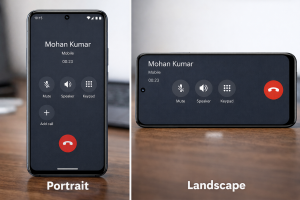
When enabled, the feature ensures that the call screen remains locked in portrait orientation, even if the phone is slightly tilted sideways. This prevents accidental UI changes that previously caused on-screen buttons—such as mute, speaker, keypad, and end call—to shift positions unexpectedly.
For many users, the automatic switch to landscape mode created practical problems. During calls, especially when using one hand, the phone could rotate unintentionally, making it harder to tap the correct buttons. In some cases, users attempting to end a call would miss the button because the interface had changed layout mid-action.
By restoring the toggle, Google aims to stabilise the calling experience and reduce accidental mis-taps during conversations.
Design and Interface Changes
The update does not significantly redesign the Phone app interface but introduces a subtle behavioural change in how orientation is handled.
Interface Behaviour Before the Update
- The call screen could rotate into landscape mode when the phone was slightly tilted.
- Button positions changed dynamically based on orientation.
- Users had limited control over this behaviour within the Phone app.
Interface Behaviour After the Update
- The call screen can remain locked in portrait mode during calls.
- Users can manually disable the portrait lock if they prefer landscape orientation.
- The setting is accessible directly within the Phone app’s display options.
How to Change the Setting
Users who want to modify the behaviour can follow these steps:
- Open the Phone app.
- Tap the three-line menu icon near the search bar.
- Go to Settings > Display options.
- Toggle off “Keep portrait mode on calls” if landscape rotation is preferred.
By default, the toggle is expected to be enabled on most devices, aligning with the preferences expressed by a majority of users.
Software Details and User Experience Changes
Feature Overview
The update focuses on improving usability rather than adding new calling capabilities. It addresses a specific pain point related to screen orientation during calls, which is a core interaction in daily smartphone use.
Privacy and Security Impact
There is no direct impact on privacy or security. The change is limited to interface behaviour and does not alter call handling, permissions, or data processing within the Phone app.
User Experience Improvements
- Reduced accidental taps during calls.
- More predictable interface layout.
- Greater control over screen orientation within the Phone app.
- Improved accessibility for one-handed usage.
For users who frequently use speaker mode or multitask during calls, the update provides a more consistent experience.
Platform Compatibility
The feature is being rolled out through the Phone by Google app, which is used on:
- Pixel smartphones
- Many Android devices with Google’s default dialer
- Select devices from OEMs that ship with the Google Phone app
Availability may vary depending on device model, Android version, and regional rollout schedules.
Expected Rollout Timeline
Google has not announced a single global release date for the feature. Instead, the rollout appears to be happening gradually via app updates.
Observed Timeline
- Initial appearance: Beta versions of the Phone app earlier last year.
- Temporary removal: Subsequent versions during internal adjustments.
- Official confirmation: Recent support note published by Google.
- Current status: Gradual rollout through updated versions of the Phone app.
As with many Google app updates, availability may depend on:
- App version updates via the Play Store
- Device manufacturer customisations
- Regional deployment schedules
Users may receive the feature automatically after updating the Phone app to the latest version.
Impact on Indian Users and Market
India is one of the world’s largest Android markets, with millions of users relying on the Phone by Google app for daily communication. The restoration of the portrait mode toggle is likely to have a noticeable impact on usability for Indian users.
Relevance for Indian Users
- High smartphone usage in one-handed scenarios.
- Frequent voice calls across personal and professional contexts.
- Diverse range of Android devices using the Google Phone app.
For Indian users, the update addresses a practical issue rather than introducing a new feature, reflecting Google’s focus on refining core user experiences in mature markets.
Broader Market Implications
The update highlights a broader trend in Android development:
- Increased reliance on user feedback in feature design.
- Iterative testing through beta versions.
- Greater emphasis on usability improvements rather than major redesigns.
For device manufacturers and app developers, the change underscores the importance of interface stability in essential applications like dialers.
Confirmed vs Reported Information
Confirmed Information
- Google has restored the “Keep portrait mode on calls” toggle in the Phone app.
- The feature allows users to prevent automatic rotation into landscape mode during calls.
- Google acknowledged user feedback and confusion caused by earlier removal of the setting.
- The feature is being rolled out via updated versions of the Phone by Google app.
Reported or Observed Details
- The toggle was previously seen in beta builds before being removed and reintroduced.
- The rollout appears gradual and may not be available on all devices simultaneously.
- Default behaviour is expected to prioritise portrait mode for most users.
Google has not provided a detailed device-wise rollout list, so availability may vary across models and regions.
Unique Insights: Why This Update Matters
Although the change appears minor, it reflects a deeper shift in how Google approaches Android usability.
Interface Stability as a Priority
For years, Android has offered flexible orientation and UI behaviour. However, in critical apps like dialers, flexibility can sometimes conflict with usability. By restoring the portrait mode toggle, Google acknowledges that stability can be more valuable than dynamic interface changes.
Feedback-Driven Development
The feature’s removal and reintroduction illustrate the complexities of software development at scale. Google’s explanation that it temporarily removed the setting to refine it suggests that community feedback plays a measurable role in shaping final features.
Implications for Future Android Updates
The update may signal that Google is willing to revisit controversial interface changes if they negatively affect everyday usage. Similar adjustments could appear in other core apps in future Android releases.
Google’s decision to restore the portrait mode control in the Phone by Google app highlights the importance of usability in core smartphone functions. While the update does not introduce new calling capabilities, it addresses a practical issue that affected everyday interactions for many Android users.
As the feature rolls out more widely, it may set a precedent for how Google balances interface flexibility with user expectations in future Android updates. For now, the restored toggle represents a small but meaningful adjustment in the evolving Android experience.
FAQ: Google Phone App Portrait Mode Update
1. What is the “Keep portrait mode on calls” feature?
It is a setting in the Phone by Google app that prevents the call screen from rotating into landscape mode during phone calls.
2. Why did Google introduce this feature?
The feature was introduced after users complained that automatic screen rotation made it harder to use call controls, especially when holding the phone in portrait mode.
3. Is the feature available on all Android phones?
Not yet. Availability depends on the Phone app version, device model, and rollout schedule. It is expected to reach more devices gradually.
4. Can users still enable landscape mode during calls?
Yes. Users can disable the portrait mode toggle in the Phone app settings if they prefer landscape orientation.
5. Does this update affect privacy or call quality?
No. The update only changes interface behaviour and does not affect privacy, security, or call performance.
6. How can users check if they have the feature?
Users can update the Phone by Google app via the Play Store and check the Display options section in the app settings.
Also Read : Google Photos May Add ‘Optimize Backup for Battery Life’ Feature on Android